 MeetCue
See your meeting as a live map.
Topics, people and decisions, mapped as people talk.
Start with 250 free credits, valid for 30 days.
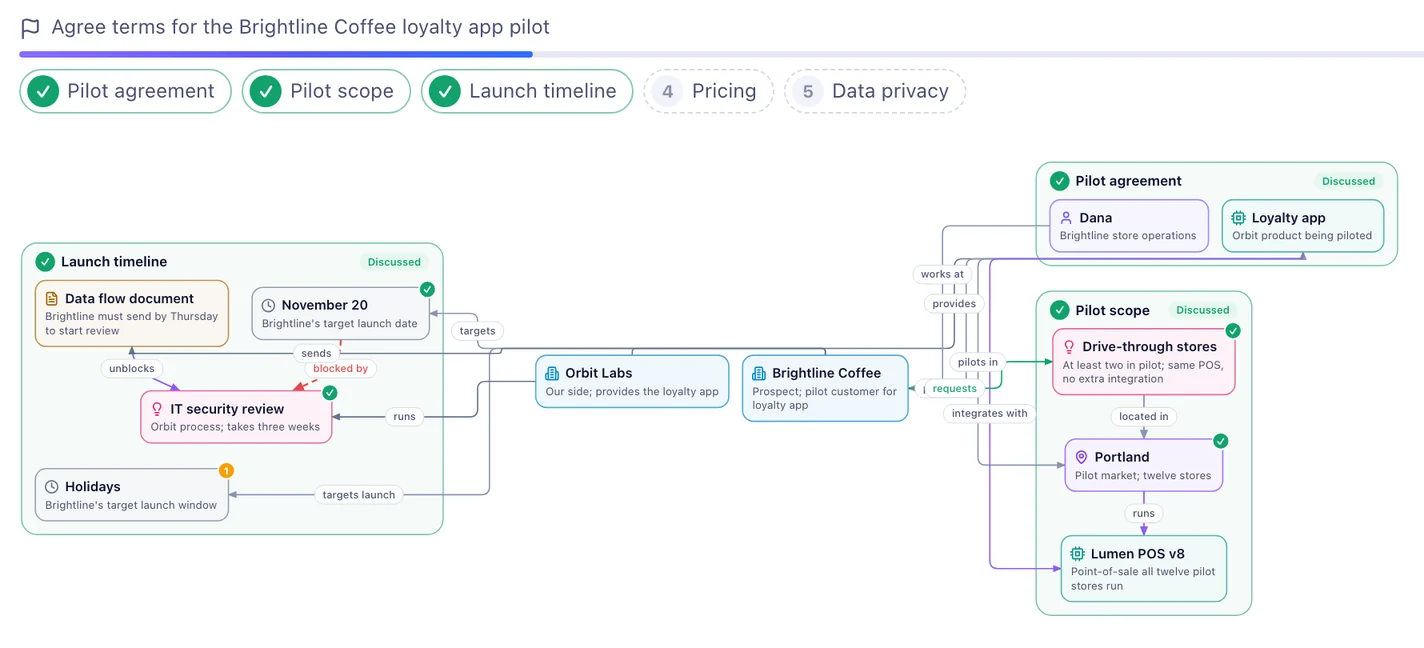
Every topic, distilled
What is settled so far, and what is still ahead. Every point, as it was said, stays right below.

What to say next
The question to ask, and lines you can say.
Your files
Prices, clauses and dates from your documents, when they come up.
Minutes
Decisions, owners and a follow-up email when you finish.
How it works
Put your phone on the table
Tap Start. MeetCue listens through the microphone while the app is open.
Watch the map grow
The first topic appears soon after people start talking.
Wrap up
Get the minutes, transcript and recording.
A monthly plan for the meetings you have.
Credits cover live transcription, AI assistance and file processing. Usage depends on the work you do; the app shows your balance and usage. Every plan includes the same meeting tools.
Starter
- 1,500 credits every month
- 1 GB for files and recordings
Plus · Recommended
- 4,500 credits every month
- 2 GB for files and recordings
Pro
- 9,500 credits every month
- 5 GB for files and recordings
Max
- 24,000 credits every month
- 10 GB for files and recordings
Planned USD prices; the store shows the final local price before purchase. Subscriptions renew monthly until cancelled in your store settings. Unused monthly credits do not roll over.
The one-time free trial includes 100 MB of storage and needs no subscription. Eligible new accounts receive 250 credits once, valid for 30 days from the start of the trial. There is no recurring free allowance.
Questions
Why does MeetCue use Google sign-in?
Google sign-in creates or finds your MeetCue account so you can access your private meetings and files. We receive your Google account identifier, verified email address, name and profile picture to manage your account and one-time trial. We request only basic identity permissions, without access to your Gmail messages, Google Drive files, Calendar events or contacts. Our Privacy Policy explains how account data is stored, used and deleted.
Who operates MeetCue?
MeetCue is operated by Penecho Inc. For help or privacy questions, contact support@penecho.ai. Read our Terms of Service and Privacy Policy before creating an account.
Who can see my meetings and files?
Your files, transcripts, maps and minutes are private to your account unless you choose to share them. The admin interface shows account and usage information, not meeting or file content. Service providers process the content needed to deliver transcription and AI features, as described in our Privacy Policy. You can delete a meeting, a file, or your account.
Do I need permission to record?
Inform participants and obtain any consent required for recording and transcription. MeetCue saves meeting recordings while storage is available. You can pause or end listening at any time and delete a meeting and its recording from the app.
Which languages work?
MeetCue transcribes many languages including English and Mandarin Chinese, also when people mix them. Minutes and cues are written in the meeting’s language, or in a language you choose.
What file types can I upload?
PDF (including scanned pages), Word (.doc and .docx), PowerPoint (.ppt and .pptx), Excel (.xlsx), CSV, plain text, Markdown and HTML, and photos or screenshots (JPG, PNG, WebP; the app turns iPhone HEIC photos into JPEG and can take a photo with the camera), up to 50 MB each. Scanned PDFs use text recognition; split files that need recognition on more than 80 pages.
Do my credits expire?
Free trial credits expire 30 days after your trial starts. A subscription provides a fresh allowance each monthly window; unused credits do not roll over. Previously purchased credit packs retain their original terms. The app shows your balance and expiry dates.
How do I cancel a subscription?
Cancel in your App Store or Google Play subscription settings. Your paid access continues until the end of the current period. Deleting your MeetCue account does not cancel the store subscription; cancel it separately to stop renewal.